Tuesday, July 10, 2018

boilerplate mad

I do love the twitter account I Am Devloper:

Boilerplates:
For when you don't want to learn the underlying technology, immediately bloat your codebase with 80% unused code and find it impossible to customise literally anything 3 months down the line.
 Of course I am too likely to think that of new frameworks in general :-D

Friday, July 6, 2018

the chrono, the wall, the stream, the froth

Kottke posted a few links lumped as Did blogs ruin the web? Or did the web ruin blogs?

My favorite was How Blogs Broke the Web - Amy Hoy breaks down how the idea of adding a chronological underpinning to content, combined with "glamorous" tools to make that easy, changed the quirky, independent, handcrafted web.

(I switched my site (then my unix-name kisrael.com, now kirk.is) to a blog at the tail end of 2000.  I avoided some of what Hoy points out by my ability to make and fondness for handbuilt tools (Perl CGI at the time, now a mix of that and PHP). I made this devblog on bloger/blogspot on purpose, to see what it was like to use that kind of tool, and it's not bad, but it has turned out to be hard to customize.)

Anyway, it's interesting comparing her points on the chronological model reshaping the web with my take on what came later, the stream vs the froth - she only touches on how the stream/wall model made online content generation far more universal, and let people curate their collection of who they read without having to bounce from place to place, and thus killed the "blogosphere"... and then of course Reddit introduced a whole 'nother model that you can't even keep up with...

Wednesday, July 4, 2018

a piece on the problem with touchscreens

Amber Case on The Hidden Cost of Touchscreens.

Kottke quoted a good passage:
Touchscreen design could benefit from some basic design principles. Color-based interfaces take less time to parse when they are glanced at. Image-based interfaces take longer for the brain to process, and the lack of contrast can be confusing, because each item must be distinguished from adjacent items. When so many images look alike, service workers must rely on position and muscle memory for speedy use. 
When I worked in food service and in the mailroom, the uglier touchscreens were always easier to work with. They were color coded with bright, contrasting colors, making the boundaries between numbers or items very obvious. I found that the colors reduced mistakes. I’d usually tap the right items after barely even glancing at the interface. After a while, I’d only check the screen for mistakes at the end of the process, before submitting an order or printing a receipt.
 Fun stuff, especially how Apple seems hell bent on some day getting to its vision of a perfect slab of glass. I always have pipe dreams that sameday we'd have some kind of clear plastick-y substance that could raise up virtual buttons on our fondle slab phones...

Sunday, June 24, 2018

good pdf to png conversion

Because I'm not adept with proper print layout tools, I tend to make a lot of things "print ready" via 300 pixels per inch pngs that I then convert to PDF. PNG2PDF is a pretty good tool for that, including lumping in multiple PNGs into a multipage PDF in about the way you'd expect.

Thursday, June 21, 2018

note to self Mac/OSX/MacOs keys / window manager dock program hyperdock

It's gratifying when I can do a simple search and dig up an old devblog post and use of share the information, and frustrating when my auto-Google mojo is weak. For some reason I couldn't find the name of an app I like to use "Hyperdock" which lets me set up some keypresses to zip windows to the side of the screen (in particular a typical large monitor window splits very nicely into two pieces.) (FOLLOWUP: I've started using SizeUp for the window management, since it has a mode for "bottom half of the screen" (crucial for portrait mode monitors) and also I've added Hyperswitch into the mix, merely to correct a behavior that was bugging me)

2020 Update: I went on a rampage of getting rid of lesser used apps sitting on the system status menu area - I think SizeUp and HyperSwitch do what I wanted HyperDock for, plus HyperSwitch fixes one bit of MacOS dumbness. Plus HyperDock seems confused, asking me to register even though I bought it through the AppStore. So, out it goes.

Sunday, June 17, 2018

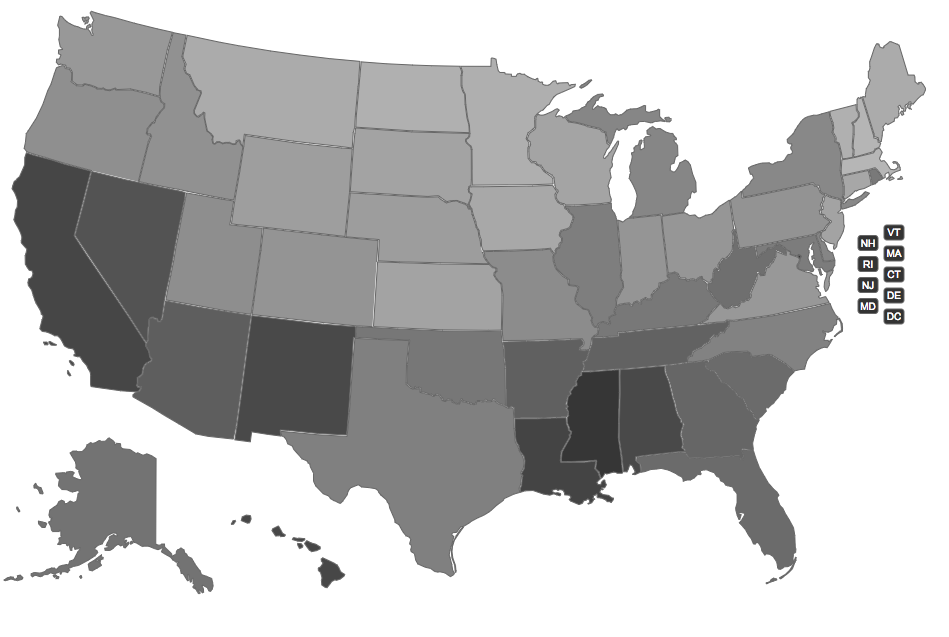
shade in the usa

 With the caveats that IQ tests are problematic, I made a potentially reusable tool to put state data on a USA map, seeding it with Inc.'s We Compared the Average IQ Scores in All 50 States, and the Results Are Eye-Opening.

Because I am a partisan jerk, I was curious if it would reflect the political divisions of our nation. Nope, though there is a maybe even more problematic latitude correlation.


The code is JQuery-ish and hacky, but it solved some fun Google/stackoverflow challenges, like "how do I make a colored map of the USA?" (US Map JQuery Plugin) "How do I convert a number from one range to another?" (I was amused that my PHP recreation of Processing's .map() function was actually valid javascript as well) "how do I convert state names to abbreviations? (US states in JSON Gist), "how do I get a hex RGB value from 3 decimal values?" (relevant stackoverflow)

Wednesday, June 13, 2018

dipping a toe into modern web dev: deployment with parcel and a hello world in react

I admit, there's part of me that wants the world forever to be

<script src="mystuff.js"></script>

(and of course, the need for it to have a separate closing tag seems odd anyway ;-)

The save, reload loop is such a nice, tight way of coding, and so easy to understand! But it's limiting - new web technologies have a build step, and that's just the way life will be for all but the most trivial vanilla.s project.

My coworker Eric Wyler found the next best thing - webpack is famously fiddly (for a laugh, just see what @IAmDevloper says about it) but he got some great results with Parcel.

Here's his Parcel bootstrap steps:

(This assumes you've installed npm already)

Pick a project name, we'll go with "fooproj" for now.

mkdir fooproj
cd fooproj
npm init -y
npm install -g parcel 
(this install parcel globally, so you just have to run it once for your first project)

Now use an editor or the command line to do the basic
cat > index.html

<html lang="en">
<head>
  <title>Parcel React Example</title>
</head>
<body>
  <div id="root"></div>
  <script src="./index.js"></script>
</body>
</html>

and

cat > index.js

import React from 'react';
import ReactDOM from 'react-dom';
const App = () => (
    <h1>Hello world</h1>
);
ReactDOM.render(<App />, document.getElementById('root'));
// Hot Module Replacement
if (module.hot) {
  module.hot.accept();
}

so after that:

npm install --save react react-dom
parcel index.html

BOOM! Like the console says, you now have a little webserver running at http://localhost:1234  - and if you make a change to index.js, and save, it automagically reloads (actually, technically it's not even reloading... in theory if you're doing something with state it might get a little munged, but for many changes it's super-instant.)

Now it looks like dist/ is already full of something ready to deploy, but for some reason it was assuming an absolute path, but a command like
parcel build index.html --public-url .
did what I wanted, and I could just plop the contents of dist/ into an arbitrary folder on my webserver.